Subhadra Yojana List Name Check Pending PDF Complete Guide to Verify Your Application Status (2026)
If you have applied for the Subhadra Yojana and want to know whether your name is in the approved beneficiary list or still showing as pending, you are not alone. Thousands of women across Odisha search daily for Subhadra Yojana list name check pending PDF to track their application progress.
This guide will help you understand exactly how to check your name in the beneficiary list, what “pending” status means, how to download the PDF, and what steps to take if your application is stuck or your name is missing.
As of 2026, over 1.07 crore (10.7 million) women across Odisha have enrolled in this scheme. Four installments have already been successfully released. The 5th installment is expected around Raksha Bandhan in August 2026. If you want to make sure you receive your payment on time, keep reading.
What is Subhadra Yojana?
Subhadra Yojana is a flagship women’s welfare scheme launched by the Government of Odisha. It provides direct financial assistance to eligible women to support their economic independence and help them meet family needs without depending on others.
The scheme is named after Devi Subhadra, the beloved sister of Lord Jagannath, which holds deep cultural meaning for the women of Odisha. Under this initiative, each eligible woman receives ₹ 50,000 over five years, transferred directly to her Aadhaar-linked bank account in two installments every year.
| Subhadra Yojana Odisha Details | |
|---|---|
| Scheme Name | Subhadra Yojana Odisha |
| Launched By | Government of Odisha (BJP Government), inaugurated by PM Narendra Modi |
| Launch Date | 17th September 2024 |
| Implemented By | Women and Child Development Department, Odisha |
| Beneficiaries | Women aged 21 to 60 years, permanent residents of Odisha |
| Total Financial Benefit | ₹ 50,000 over 5 years (2024–2029) |
| Annual Assistance | ₹ 10,000 per year |
| Payment Per Installment | ₹ 5,000 (two installments per year) |
| Payment Schedule | Raksha Bandhan (August) and International Women's Day (March 8) |
| Payment Mode | Direct Bank Transfer (DBT) to Aadhaar-linked bank account |
| Total Budget Allocated | ₹ 55,825 crore |
| Official Website | subhadra.odisha.gov.in |
| Helpline Number | 14678 (Toll-Free) |
| Total Enrolled Women | Over 1.07 crore across all 30 districts of Odisha |
Understanding the Subhadra Yojana Pending List
What Does "Pending" Status Mean?
When your application shows as “pending,” it means your details are still being reviewed by the concerned department. It does not automatically mean your application has been rejected. It simply means the verification process is still going on.
There are different types of pending statuses you may see:
- Application Under Review: Your form has been received and verification is in progress.
- e-KYC Pending: Your face authentication or biometric verification is not yet completed.
- NPCI Failure: Your bank account is not properly linked with Aadhaar for DBT payments.
- Document Verification Pending: Some uploaded documents need cross-checking.
Why Do Applications Stay Pending?
Several common reasons cause applications to stay in pending status for a longer time:
1. Incomplete application form with missing details
2. Incorrect personal information that does not match Aadhaar records
3. e-KYC (face authentication) not completed through the Subhadra App or CSC
4. Bank account not Aadhaar-seeded or not NPCI-enabled for DBT
5. Very high volume of applications across Odisha causing processing delays
6. Name or age discrepancy between Aadhaar card and application form
7. Pending field verification by the local government official
If your application has been pending for more than 4 to 6 weeks, it is time to take action. The steps below will help.
How to Check Subhadra Yojana List Name Status Online (Step-by-Step)
Checking your Subhadra Yojana status is easy and can be done from home using the official portal. Here are the two main methods.
Method 1: Check Your Name in the Beneficiary List
Step 1: Open your browser and visit the official portal at subhadra.odisha.gov.in
Step 2: On the homepage, click on the “Beneficiary List” option
Step 3: Select your location details one by one:
– District (your district name)
– Block or Tehsil (your block)
– Gram Panchayat (your village panchayat)
– Ward number (your ward)
Step 4: Click the “View” button to load the beneficiary list for your area
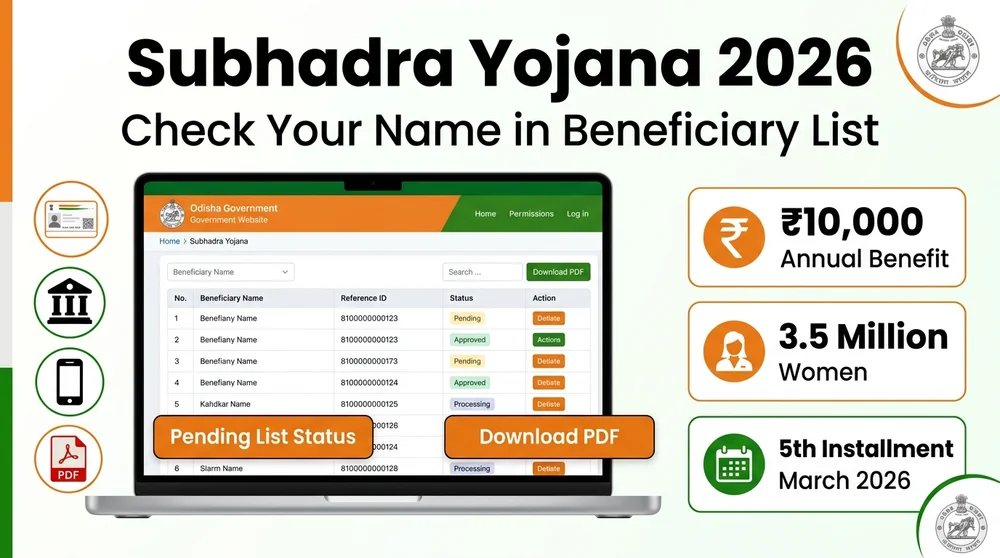
Step 5: Once the list opens, press Ctrl+F on your keyboard and type your name to find it quickly
Step 6: If your name appears in the list, you are an approved beneficiary and eligible to receive DBT payments
Method 2: Track Your Individual Application Status
Step 1: Go to subhadra.odisha.gov.in
Step 2: Click on “Track Application Status” or “Application Status”
Step 3: Enter either your 12-digit Aadhaar number or your 16-digit Application Reference Number
Step 4: Verify your identity through OTP sent to your registered mobile number
Step 5: Your current status will be displayed it will show as Approved, Pending, Under Review, NPCI Failure, or Action Required
Step 6: If both “eKYC Complete” and “NPCI Active” indicators show green, you are good to receive the next payment
How to Download Subhadra Yojana Pending List PDF
Many applicants want to download the beneficiary or pending list in PDF format for reference. Here is how you can do it.
Download Steps
Step 1: Go to subhadra.odisha.gov.in and click “Beneficiary List” from the menu
Step 2: Enter your district, block, gram panchayat, and ward number
Step 3: Click “View” to load the list on your screen
Step 4: Look for a “Download” or “PDF” button on the page and click it
Step 5: The PDF will be saved to your phone or computer
If Direct PDF Download Is Not Available
If you cannot find a download button on the portal, you have these options:
- Use your browser’s built-in Print option and select “Save as PDF” to save the list
- Visit your nearest Mo Seva Kendra (MSK) or Common Service Center (CSC) the operator can download and print an official copy for you free of charge
- Call the helpline 14678 for guidance on getting official PDF documents
Common Reasons for Subhadra Yojana Pending Application
| Reason | Description | Solution |
|---|---|---|
| Incomplete Application | Missing fields or unsubmitted form sections. | Log in to the portal and complete all required fields. |
| Incorrect Details | Name, date of birth, or Aadhaar number entered incorrectly. | Correct the mistakes and resubmit with accurate information. |
| e-KYC Pending | Face authentication not yet completed. | Visit a Mo Seva Kendra or CSC with your Aadhaar card for biometric verification. |
| NPCI Failure | Bank account not Aadhaar-seeded or not DBT-enabled. | Visit your bank branch and ask them to complete Aadhaar seeding for DBT (specifically mention Subhadra Yojana). |
| High Application Volume | Over 1 crore applications received, causing processing backlogs. | Wait 4 to 6 weeks and check status again. |
| Eligibility Issue | Applicant may not meet one or more scheme criteria. | Review your eligibility carefully before contacting support. |
| Name Not Found in List | Name not appearing in the beneficiary list after approval. | Check the pending list, verify application number, and contact helpline 14678. |
Steps to Resolve Pending Subhadra Yojana Application
If your application is showing as pending, do not panic. Follow these steps one by one.
Step 1: Verify Your Application Details
Log into the Subhadra portal and carefully check that your name, Aadhaar number, date of birth, address, and bank account details are all entered correctly. Even a small typo can delay verification.
Step 2: Complete e-KYC (Face Authentication)
From 2026 onward, face authentication e-KYC is mandatory for all beneficiaries. You cannot complete this from home. Visit your nearest Mo Seva Kendra or CSC, carry your original Aadhaar card, and ask the operator to complete your Subhadra Yojana face e-KYC. The process takes about 10 minutes.
Step 3: Fix NPCI / Bank Linking Issue
Step 4: Upload Missing Documents
If any documents are missing from your application, submit them as soon as possible:
- Aadhaar Card
- Aadhaar-linked bank account details
- Residence Certificate (proof of Odisha address)
- Income Certificate (if not under NFSA or SFSS)
- Passport-size photograph
- Ration Card (NFSA or SFSS)
Step 5: Contact the Helpline
Call toll-free helpline 14678 (available Monday to Saturday, 9 AM to 6 PM) for guidance on your specific pending issue.
Step 6: Visit Your Local Office
If the helpline cannot resolve your issue, visit any of these local centers in person with your Aadhaar card and application receipt:
- Mo Seva Kendra (MSK) primary center for Subhadra applications
- Common Service Center (CSC) / Jana Seva Kendra
- Block Development Office (BDO)
- Anganwadi Centre
- Nagar Nigam or ULB Office
Step 7: Check the NPCI Failure List on the Portal
If you have not received payment but believe you are approved, check the NPCI rejected list:
Step 1: Go to subhadra.odisha.gov.in
Step 2: Click on “NPCI Failure List” or “Bank A/c Activation or Updation Needed List”
Step 3: Enter your district, block, and gram panchayat details
Step 4: Click View
Step 5: If your name appears here, visit your bank immediately for NPCI linking and e-KYC activation
Subhadra Yojana Eligibility Criteria 2026
Who Is Eligible?
| # | Criteria | Requirement |
|---|---|---|
| 1 | Residency | Must be a permanent resident of Odisha with valid domicile proof (Voter ID, Ration Card, or Aadhaar with Odisha address). |
| 2 | Gender | Only female applicants (both married and unmarried women are eligible). |
| 3 | Age Limit | Between 21 and 60 years of age. For 2025-26, birth date must fall between 02 April 1965 and 01 April 2004. |
| 4 | Financial Status | Must hold an NFSA or SFSS ration card, OR have a family annual income below Rs. 2.5 lakh with an income certificate. |
| 5 | Bank Account | Must have an Aadhaar-linked, DBT-enabled, single-holder bank account in your own name. |
| 6 | e-KYC | Must complete Aadhaar e-KYC via OTP or face biometric authentication. |
| 7 | Special Inclusion | Anganwadi workers, ASHA workers, and Community Resource Persons (CRP) are eligible even if they receive a government honorarium. |
Who Is NOT Eligible?
The following categories are excluded from the scheme:
- Government employees or women whose husband is a government employee or pensioner
- Income tax payers or women whose family members pay income tax
- Women receiving a monthly pension of ₹ 1,500 or more from any government scheme
- Women who own more than 5 acres of irrigated land
- Elected representatives at Panchayat, Municipal, or higher levels
Required Documents for Subhadra Yojana Application
Before applying, keep these documents ready.
Mandatory Documents
- Aadhaar Card (identity and e-KYC verification)
Bank Passbook or Account Details (Aadhaar-linked, DBT-enabled, single-holder account) - Residence Certificate or Proof of Odisha address (voter ID, electricity bill, or Aadhaar with Odisha address)
- Ration Card (NFSA or SFSS card if applicable)
- Income Certificate (required if you do not have NFSA or SFSS card)
- Aadhaar-linked Mobile Number (for OTP verification)
- Passport-size Photograph
- PAN Card (if available)
How to Apply for Subhadra Yojana 2026
Offline Application Process (Primary Method)
Step 1: Get your application form for free from any of these centers:
- Anganwadi Centre
- Block Development Office
- Mo Seva Kendra (MSK)
- Common Service Center (CSC) / Jana Seva Kendra
- Nagar Nigam Office
Note: The application form is completely free. Do not pay anyone for it.
Step 2: Fill out the form carefully with accurate information:
- Full name (exactly as on Aadhaar)
- Aadhaar number
- Date of birth
- Address (matching Aadhaar)
- Aadhaar-linked bank account details
- Aadhaar-linked mobile number
- NFSA or SFSS ration card details (if applicable)
- Family annual income
Step 3: Attach self-attested photocopies of required documents
Step 4: Submit your completed form at the nearest Mo Seva Kendra or CSC
Step 5: Complete Face Authentication e-KYC at the center itself using the Subhadra App
Step 6: Collect your printed acknowledgement receipt keep it safe for future reference
Step 7: Once approved and bank linking is confirmed, you will receive ₹ 5,000 per installment directly in your bank account.
Online Application
Subhadra Yojana Installment Schedule 2024 to 2026
The scheme releases payments twice a year once on Raksha Bandhan (August) and once on International Women’s Day (March 8). Each installment is ₹ 5,000.
Installment Timeline and Schedule
Total Benefit over 5 years: ₹ 50,000 (2024 to 2029)
Important: Each installment is ₹ 5,000, not ₹ 10,000. Two installments add up to ₹ 10,000 per year. The official date for the August 2026 installment has not been announced yet. Monitor subhadra.odisha.gov.in for confirmed announcements.
To receive your upcoming payment without any issue:
- Make sure your Face Authentication e-KYC is complete and shows “green” on the portal
- Confirm your bank account shows “NPCI Active” status on the portal
- Ensure your Aadhaar is seeded with your bank account for DBT
What to Do If Your Name Is Not Found in Subhadra Yojana List
If you search the beneficiary list but cannot find your name, follow these steps:
1. Check the Pending List: Your application may still be under verification. Look for your name in the pending or “under process” list.
2. Verify Your Application Number: Make sure you are entering your correct 16-digit Application Reference Number.
3. Confirm Location Details: Ensure you are selecting the correct district, block, and gram panchayat when browsing the list.
4. Check the NPCI Failure List: Visit the portal and check if your name appears in the “Bank Account Activation Needed” or NPCI failure section.
5. Contact Helpline: Call 14678 and share your application number for assistance.
6. Visit Local Office: Go to your nearest Mo Seva Kendra or Block Development Office with your Aadhaar card and acknowledgement receipt for in-person inquiry.
Frequently Asked Questions (FAQs)
What is the Subhadra Yojana Pending List?
How long does it take for Subhadra Yojana application to get approved?
Can I apply for Subhadra Yojana online?
What should I do if my Subhadra Yojana application has been pending for a long time?
Is there a Subhadra Yojana mobile app?
How much money does Subhadra Yojana give per installment?
Each installment is ₹ 5,000. Two installments are released per year (Raksha Bandhan and International Women’s Day), totaling ₹ 10,000 per year. Over 5 years, the total benefit is ₹ 50,000.
Can unmarried women apply for Subhadra Yojana?
Where can I download the Subhadra Yojana application form PDF?
What is the helpline number for Subhadra Yojana?
What if my bank account is not Aadhaar-linked?
What is the next installment date in 2026?
Is the Subhadra Yojana application form free?
Important Official Links
Official Website: subhadra.odisha.gov.in
Track Application Status: subhadra.odisha.gov.in (click “Application Status”)
NPCI Failure List: subhadra.odisha.gov.in (click “NPCI Failure List”)
Scheme Information: myscheme.gov.in/schemes/subhadra
Subhadra App: Available on Google Play Store (search “Subhadra Yojana”)
Helpline: 14678 (Mon–Sat, 9 AM to 6 PM)