
Subhadra Yojana Rejected List 2025–2026 Rejection Reasons, How to Fix & Reapply
Getting rejected from Subhadra Yojana can be discouraging, but most rejections are fixable. The Subhadra Yojana rejected list is published on the official portal showing applications that did not pass verification. Understanding why your application was rejected and what steps to take can help you reapply successfully and receive the ₹5,000 installment you deserve. This page covers every type of rejection, how to check if your name is on the rejected list, and how to appeal or reapply.
Important: Do not reapply immediately after rejection without first fixing the specific issue it will be rejected again for the same reason. Read the rejection reason code carefully and correct that specific problem before resubmitting.
How to Check If Your Application Is on the Subhadra Yojana Rejected List
Visit the Official Portal:
- Go to subhadra.odisha.gov.in.
- Click “NPCI Reject List” or “Application Status”
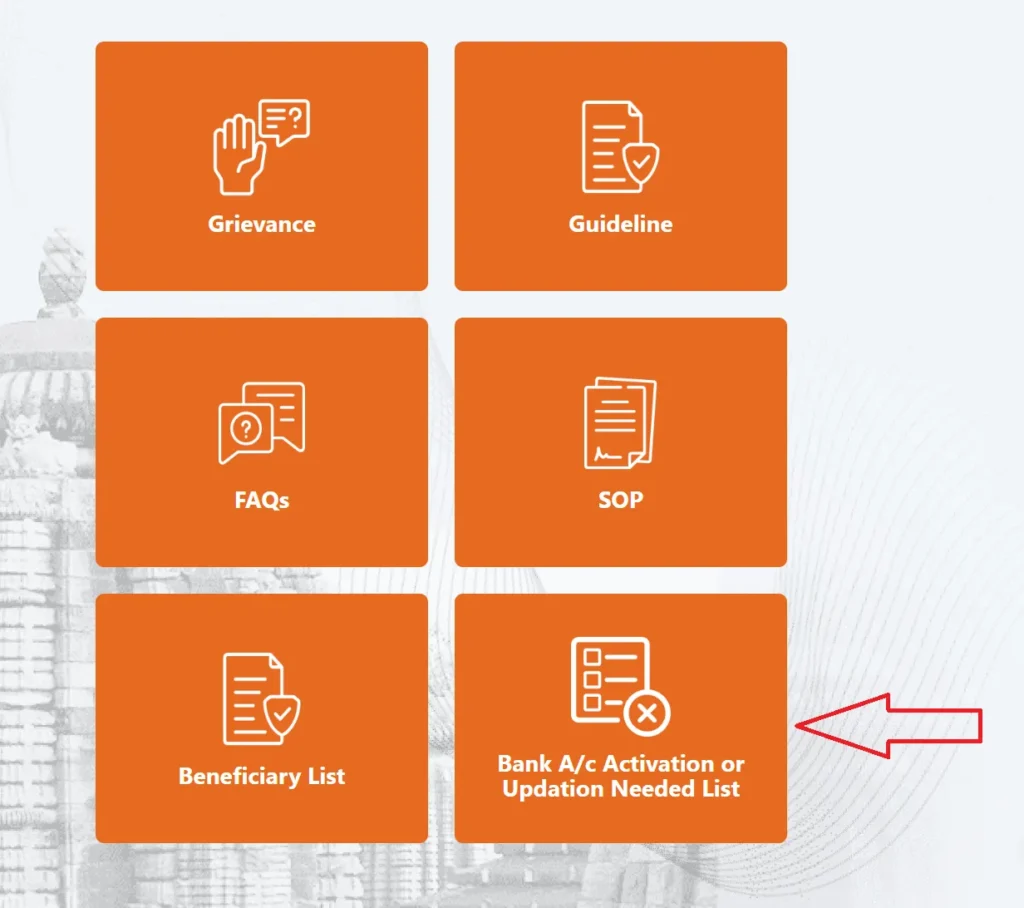
Click “NPCI Reject List” or “Application Status“
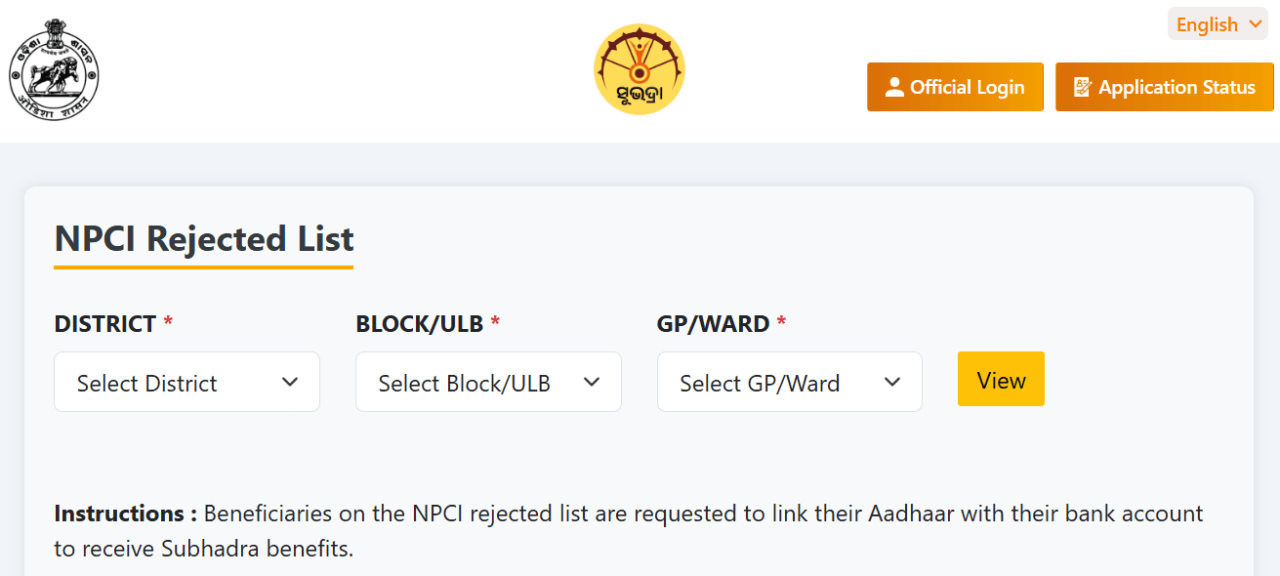
Enter your Aadhaar number or Application Inward Number.
If status shows “Rejected”, the rejection reason code will be displayed.
Alternatively, go to the “Rejected List” section and search by district, block, and panchayat.
Top Rejection Reasons and How to Fix Each One
| Rejection Reason | What It Means | How to Fix |
|---|---|---|
| Name Mismatch | Name on Aadhaar differs from bank records | Update Aadhaar name OR update bank KYC — both must match exactly |
| NPCI Rejected | Aadhaar not seeded to bank / DBT not enabled | Visit bank branch to seed Aadhaar and enable DBT — verify after 7–10 days |
| DLSC Rejected | Application rejected after district verification | Appeal at BDO or District WCD office within 30 days |
| Duplicate Application | Multiple applications detected | Withdraw extra applications at nearest CSC |
| Income Above Limit | Income exceeds ₹2.5 lakh/year | Submit updated income certificate |
| Ineligible Category | Govt employee / taxpayer / pensioner | Appeal with proof at District office |
| Incomplete Documents | Missing or unclear documents | Reapply with clear documents |
| e-KYC Failed | Biometric verification failed | Visit CSC for re-KYC |
What Is DLSC Rejection in Subhadra Yojana?
DLSC stands for District Level Selection Committee. A DLSC rejection means the district-level review body examined your application and found it ineligible or containing discrepancies that field verification could not resolve. This is a formal rejection that requires an official appeal. Visit your Block Development Office (BDO) or District WCD office within 30 days of rejection with your original documents and rejection reason code to file a formal appeal.
What Is NPCI Rejection in Subhadra Yojana?
An NPCI rejection means that while your application may be approved, the actual DBT payment failed because your Aadhaar is not properly linked to your bank account or DBT is not activated on your account. This is a payment-level rejection, not an application-level rejection. Your application remains valid you just need to fix the bank-Aadhaar linkage and the next installment will credit automatically.
Fix NPCI Rejection: Visit your bank branch with Aadhaar card, bank passbook, and a photo ID. Request “Aadhaar seeding” and “DBT activation.” Verify through NPCI mapper after 7 to 10 working days before the next installment date.
Complete NPCI & DBT fix guide → | How to file a grievance →
How to Reapply After Subhadra Yojana Rejection
The Subhadra Yojana Beneficiary List 2026 is published on the official portal after each verification cycle. If your name appears on the list, your payment will be credited on the next installment date.
Note the exact rejection reason code from the portal
Fix the specific issue update documents, bank records, or Aadhaar as needed
Visit your nearest CSC with corrected documents and original ID proof
Inform the VLE about the previous rejection and reason — they will note it in the new application
Complete fresh e-KYC and submit the corrected application
Collect a new Application Inward Number and track status after 5 working days
Frequently Asked Questions Rejected List 2025–2026
Q1. How do I check my name in the Subhadra Yojana Rejected List?
Visit subhadra.odisha.gov.in and go to “Application Status” or “NPCI Reject List.” Enter your Aadhaar number or Application Inward Number. If your status shows “Rejected,” the rejection reason code will be displayed on screen. You can also browse the Rejected List section by selecting your District, Block, and Gram Panchayat to see a full list of rejected applications in your area.
Q2. What are the most common reasons for Subhadra Yojana rejection in 2026?
The top rejection reasons in 2026 are: name mismatch between Aadhaar and bank records, NPCI rejection due to inactive DBT or unlinked Aadhaar, duplicate application from the same household, income above the ₹2.5 lakh annual limit, ineligible category (government employee or pensioner), incomplete documents, failed e-KYC biometric, and wrongful inclusion of a four-wheeler owning household. Each of these is fixable the correction process depends on the specific rejection code shown.
Q3. Can I reapply after my Subhadra Yojana application is rejected?
Yes, most rejections are fixable and you can reapply after correcting the specific issue. First identify the rejection reason code from the portal. Then correct that exact issue update your Aadhaar, fix bank DBT, submit missing documents, or withdraw duplicate applications. Only then reapply at your nearest CSC with all corrected original documents. Reapplying without fixing the root cause results in repeated rejection.
Q4. What is DLSC rejected status in Subhadra Yojana?
DLSC stands for District Level Selection Committee the district-level body that reviews applications after field verification. A DLSC rejection is a formal government decision that your application did not meet eligibility criteria based on field evidence. To appeal, visit your Block Development Office (BDO) or District WCD office within 30 days of the rejection with original documents and your rejection notice. Successful appeals are reviewed at the state level.
Q5. My application was rejected due to name mismatch — how to fix it?
A name mismatch happens when the name on your Aadhaar card differs from the name on your bank account for example, Aadhaar says “Sunita Devi” but bank says “Sunitadevi.” Fix this by either updating your Aadhaar name at an Aadhaar Seva Kendra or updating your bank KYC so both records show the exact same name. Once both match precisely, reapply at a CSC — the corrected matching name will pass verification successfully.
Q6. How long does it take to reapply after Subhadra Yojana rejection?
After fixing the rejection issue, you can reapply immediately at a CSC. Processing the new application takes 30 to 60 days field verification, DLSC review, and NPCI validation must all be completed before approval. If you fix your issue and reapply before July 2026, you may be included in the 5th installment in August 2026. Apply as soon as your correction is in place to avoid missing the next payment cycle.
Q7. Can I file a grievance for wrongful Subhadra Yojana rejection?
Yes. If you believe your application was wrongly rejected for example, you were incorrectly flagged as a government employee or income-tax payer you have the right to file an official grievance. Go to subhadra.odisha.gov.in and click “Grievance” to submit your complaint with your Application ID and supporting documents. You can also visit the District WCD office or call 14678 to escalate. Provide clear documentary proof showing why the rejection reason was incorrect.
Q8. What does "application rejected with no reason" mean?
Some applicants report that their application shows as rejected without a specific reason code displayed. This can happen due to backend data errors or pending data synchronisation between blocks and the state system. In this case, visit your CSC and ask the VLE to log into the backend system to retrieve the full rejection details. Also call 14678 with your Application Inward Number to request the official rejection reason in writing from the WCD department.
Q9. Will rejection from Subhadra Yojana affect my eligibility for other government schemes?
A straightforward rejection for fixable reasons like name mismatch or missing documents does not affect your eligibility for other government schemes. However, if your application was rejected because you provided false information such as hiding a government job, fake ration card, or inflated income the entire household can be banned from Women and Child Development schemes for 3 years. Always submit truthful and accurate information to avoid this serious consequence.
Q10. Is the Subhadra Yojana rejected list available district-wise in PDF?
The official portal does not publicly release a complete district-wise rejected list in PDF format for privacy reasons. Individual applicants can check their own rejection status using their Aadhaar number or Application Inward Number. Block-level and Panchayat-level rejection data may be accessible at BDO offices and local Gram Panchayat offices for administrative review purposes. Contact your BDO office if you need a written confirmation of your rejection reason for an appeal.