
Subhadra Yojana
Status Check 2026
How to Check Online Using Aadhaar Card
Knowing your Subhadra Yojana status is the first step to confirming whether your ₹5,000 installment will be credited on time. As of April 2026, over 1.12 crore women received the 4th installment on March 8, 2026. If you have not received your payment or are unsure about your application progress, this guide explains exactly how to check your status in under 2 minutes using your Aadhaar card or application ID.
How to Check Subhadra Yojana Status Online Step by Step
The official portal subhadra.odisha.gov.in allows any applicant to check their status without logging in. Follow these steps:
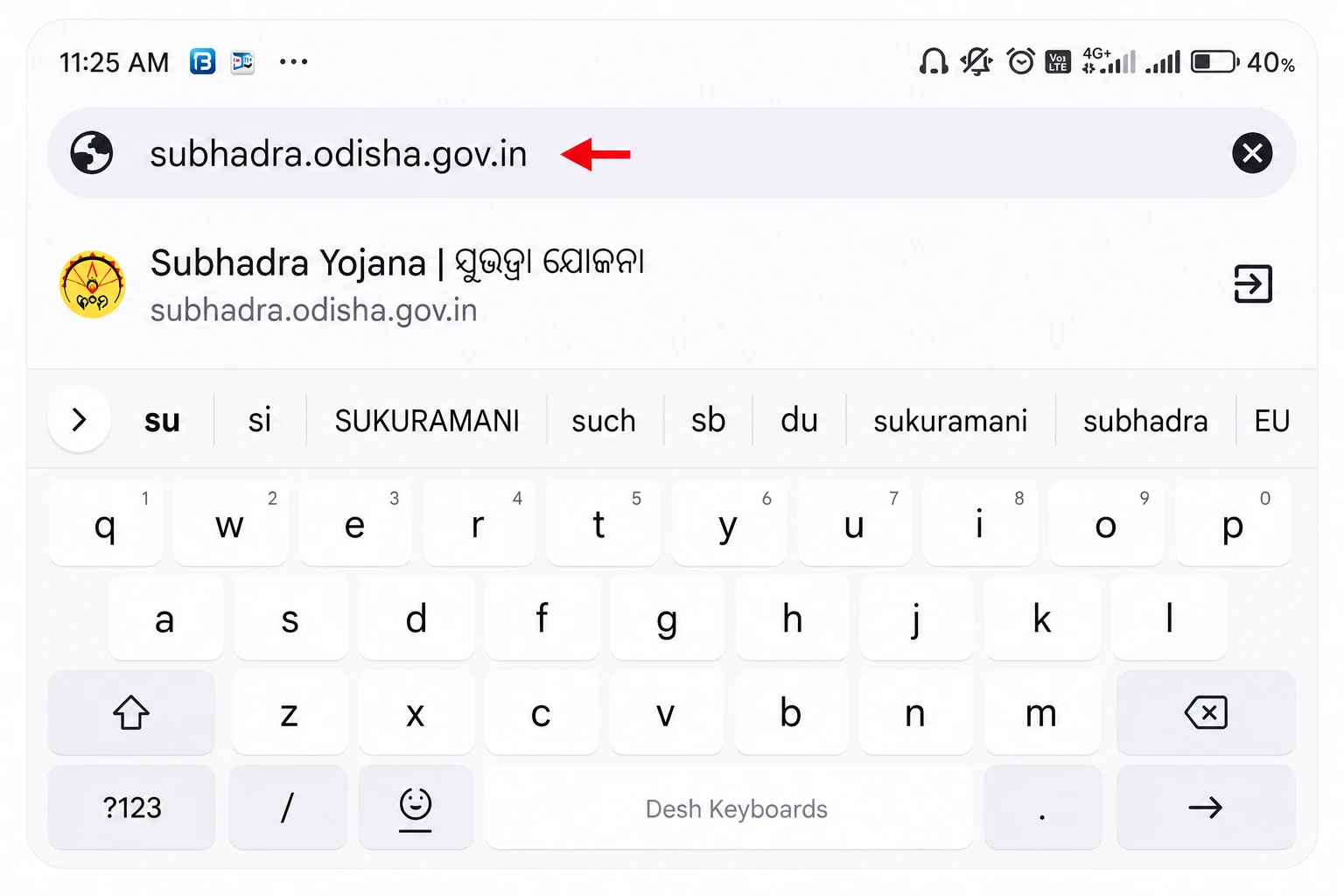
Open your browser and go to subhadra.odisha.gov.in.
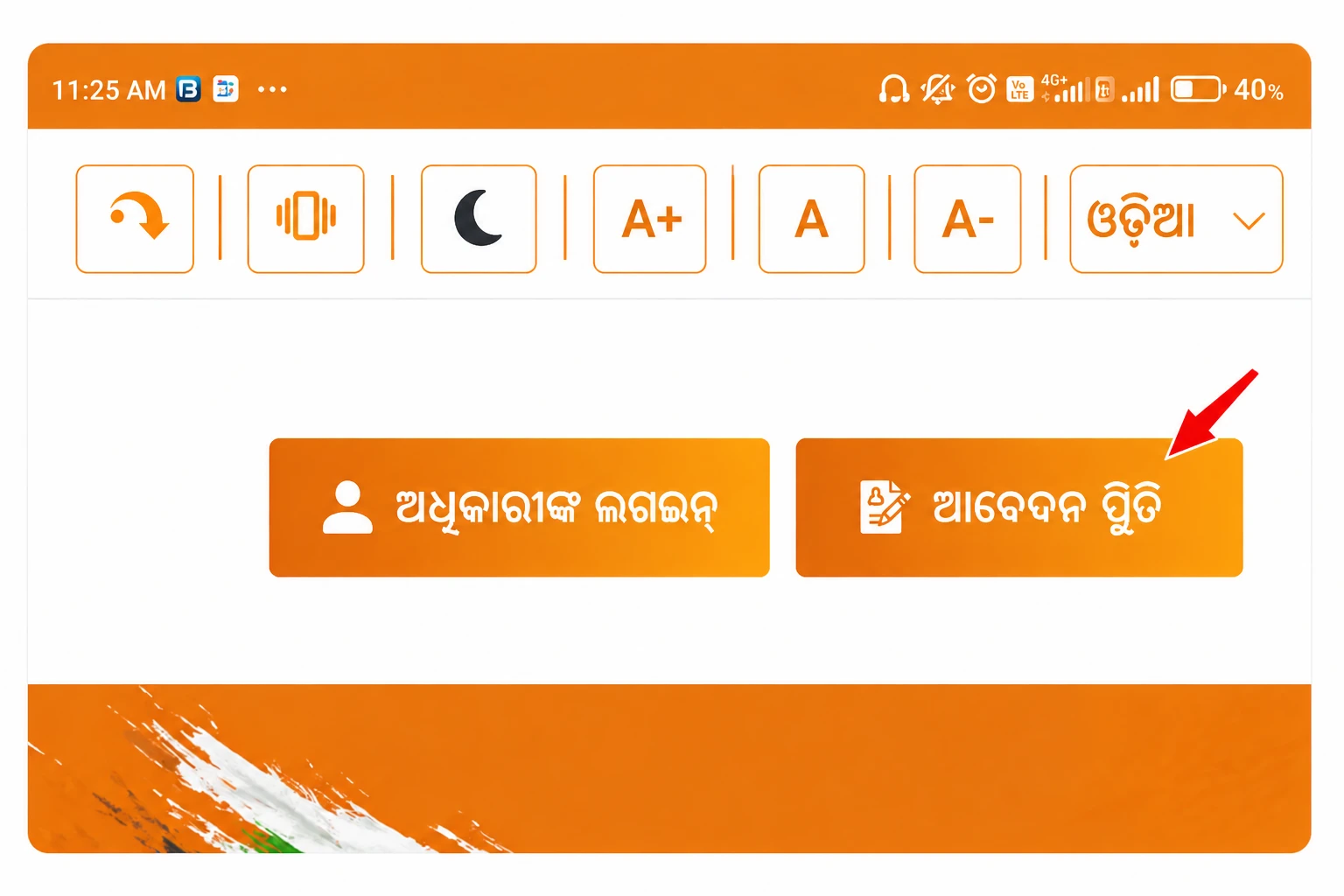
Click on “Track Application Status” or “Check Status” on the homepage.
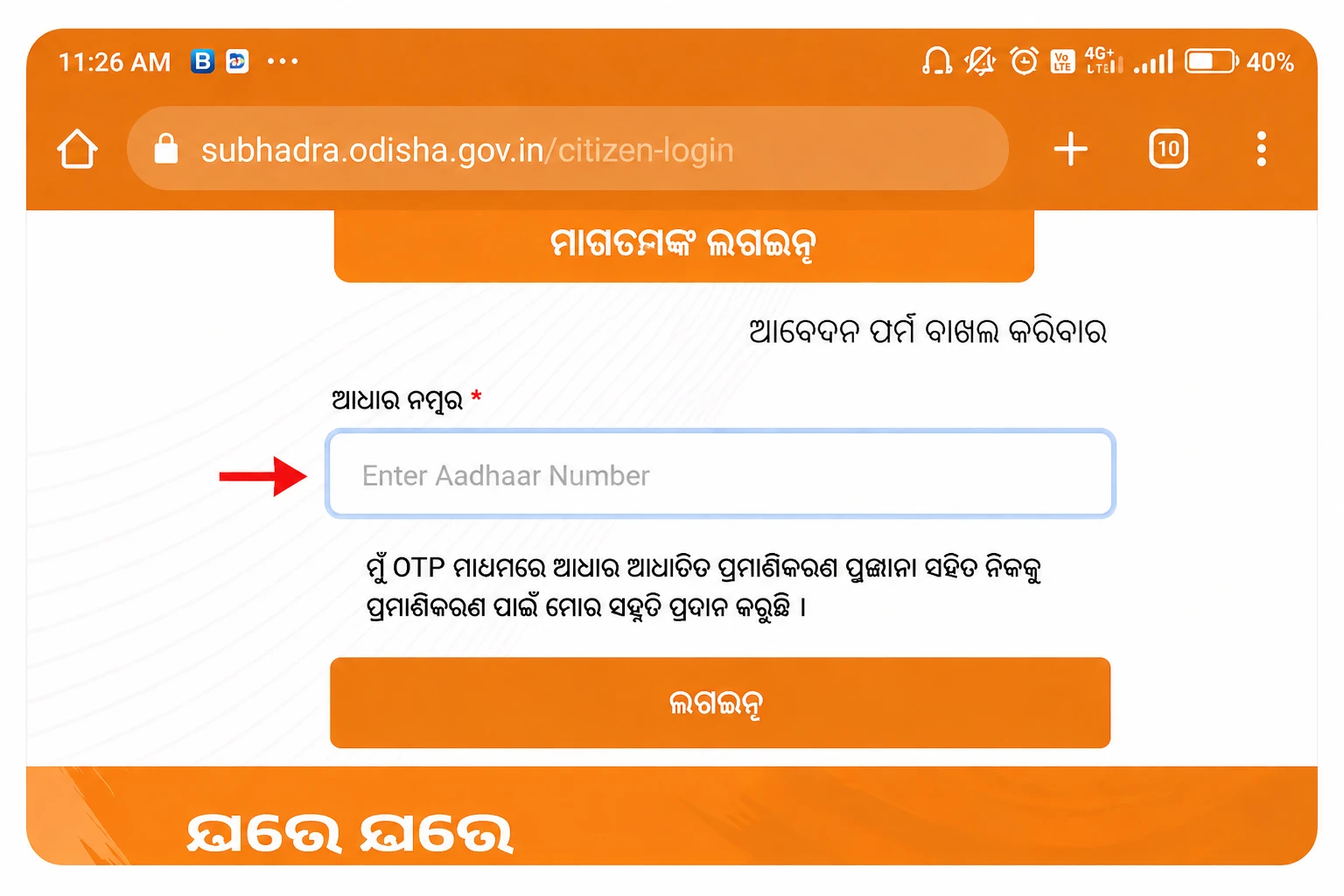
Enter your 12-digit Aadhaar number or 16-digit Application Inward Number.
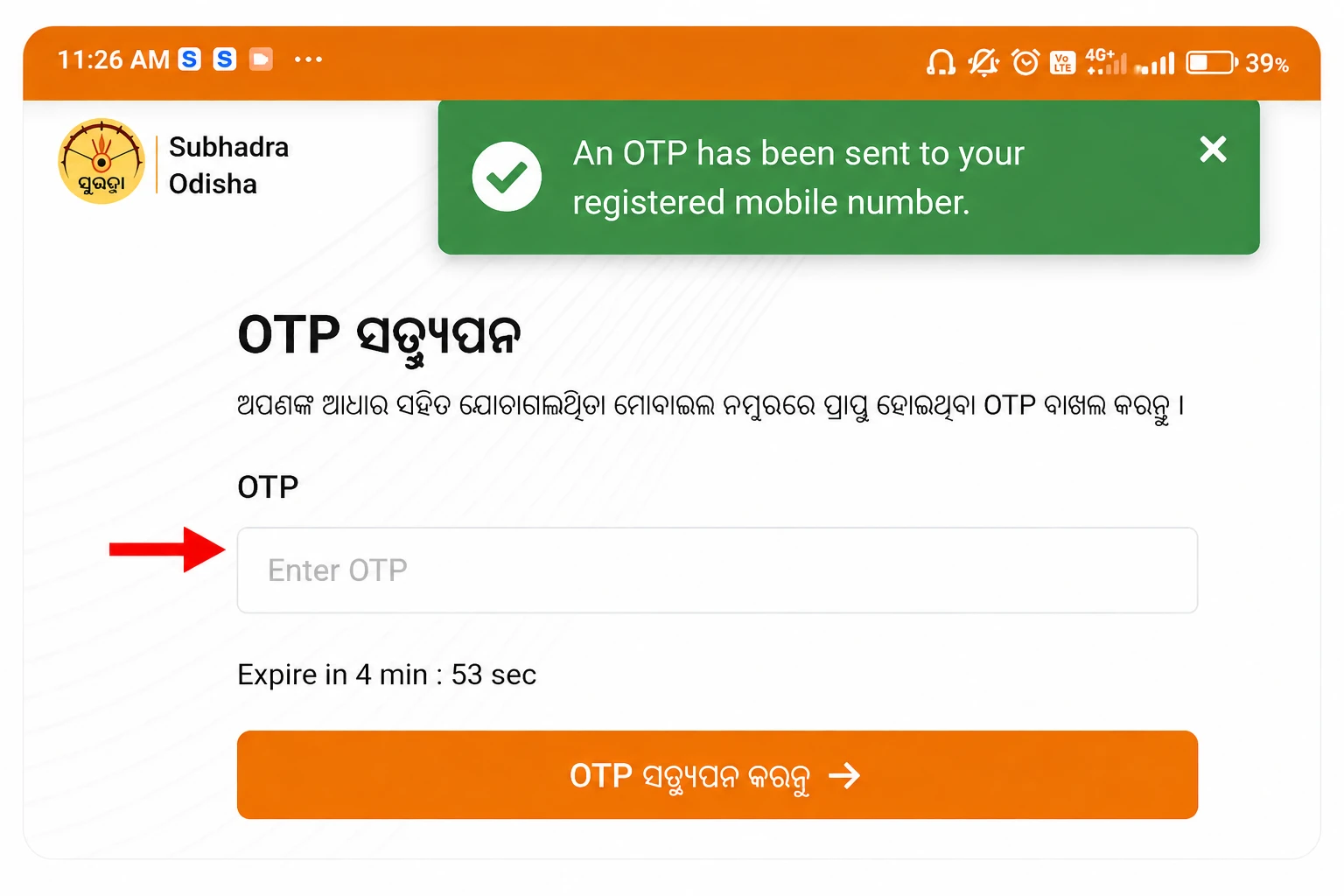
Enter the OTP sent to your registered mobile number if prompted.
Click Submit; your current status will appear on screen immediately.
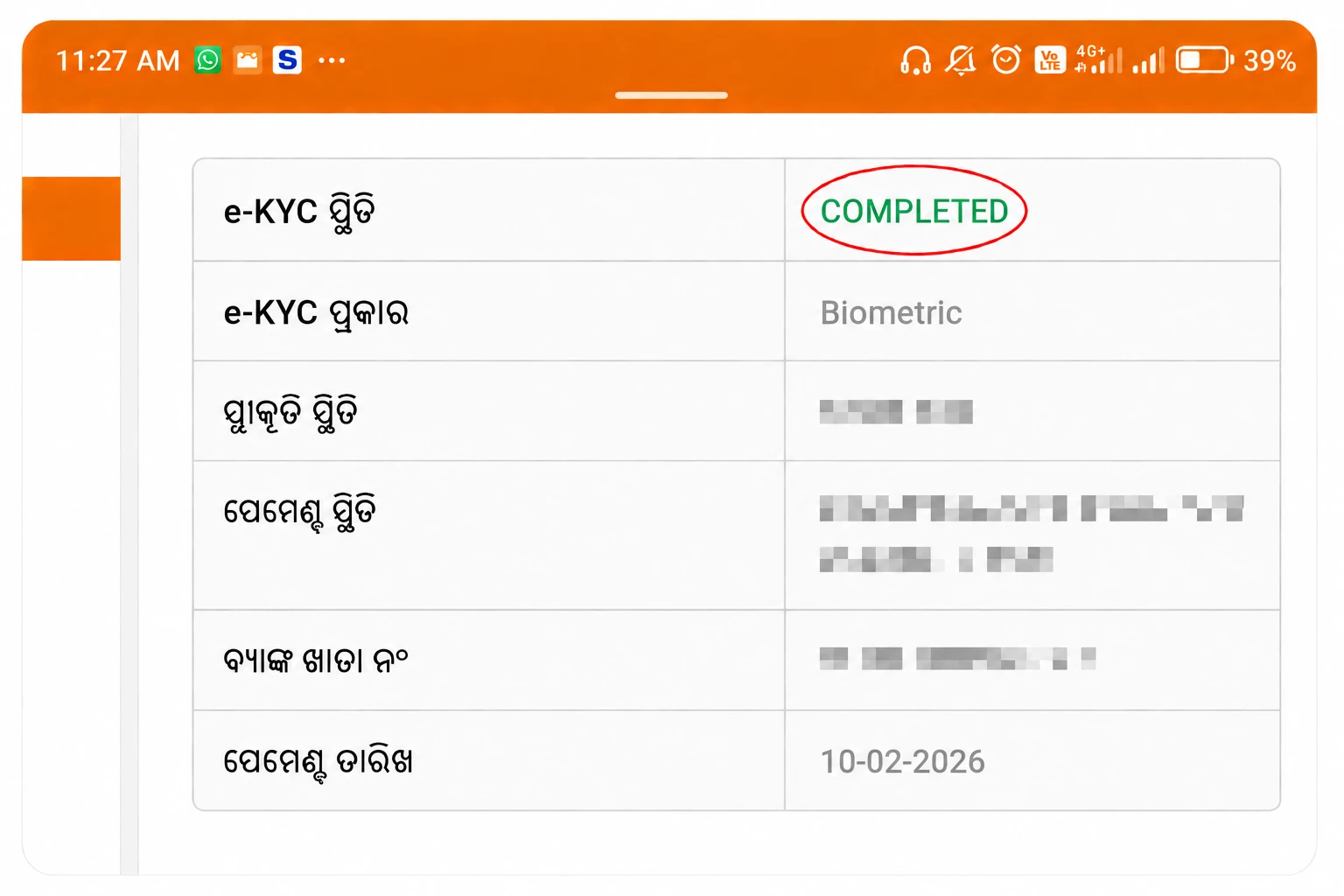
Mobile users: The portal is fully mobile optimised. Open Chrome or Safari on your phone and follow the exact same steps. No app download is required. Avoid any third-party apps claiming to check your status use only the official portal.
Check Subhadra Yojana Status Using Aadhaar Card
The most common method to check status is via Aadhaar card number. Since your Aadhaar is the primary ID linked to your application and bank account, the portal instantly pulls your latest application and payment status once you enter it. Make sure you enter all 12 digits correctly with no spaces. If you have changed your Aadhaar number after applying, use your Application Inward Number instead.
Full guide Subhadra Yojana Status Check by Aadhaar Card →
What Do the Different Status Messages Mean?
| Status Message | What It Means | What to Do |
|---|---|---|
| Approved | Application accepted — you will receive payment on next installment date | Ensure bank is Aadhaar-linked & DBT-enabled |
| Under Process / Under Verification | Application is being reviewed by field staff or DLSC | Wait 15–30 days. Visit CSC if it stays beyond 45 days |
| Rejected | Application declined — reason code will be shown | Fix the issue and reapply at nearest CSC |
| Payment Processed | ₹5,000 has been sent to your bank via DBT | Check bank passbook for “SUBHADRA” or “GOVT ODISHA” credit |
| NPCI Rejected | Aadhaar not linked to bank or DBT not enabled | Visit your bank immediately to seed Aadhaar and enable DBT |
Subhadra Yojana Payment Status Check 4th Installment (March 2026)
The 4th installment of ₹5,000 was released on March 8, 2026 (International Women’s Day). Chief Minister Mohan Charan Majhi transferred ₹5,106.33 crore to over 1,12,12,665 women across Odisha in one single DBT transfer. If you were an approved beneficiary before the verification cutoff for this cycle, the amount should already appear in your Aadhaar-linked bank account. Check your passbook or bank SMS for a credit message containing “SUBHADRA.”
If your status shows “Payment Processed” but money has not arrived, the most common reason is an inactive DBT link. Visit your bank with your Aadhaar card and request Aadhaar seeding and DBT activation. The credit will come in the next available window once fixed.
How to Check Status on Mobile Without a Computer
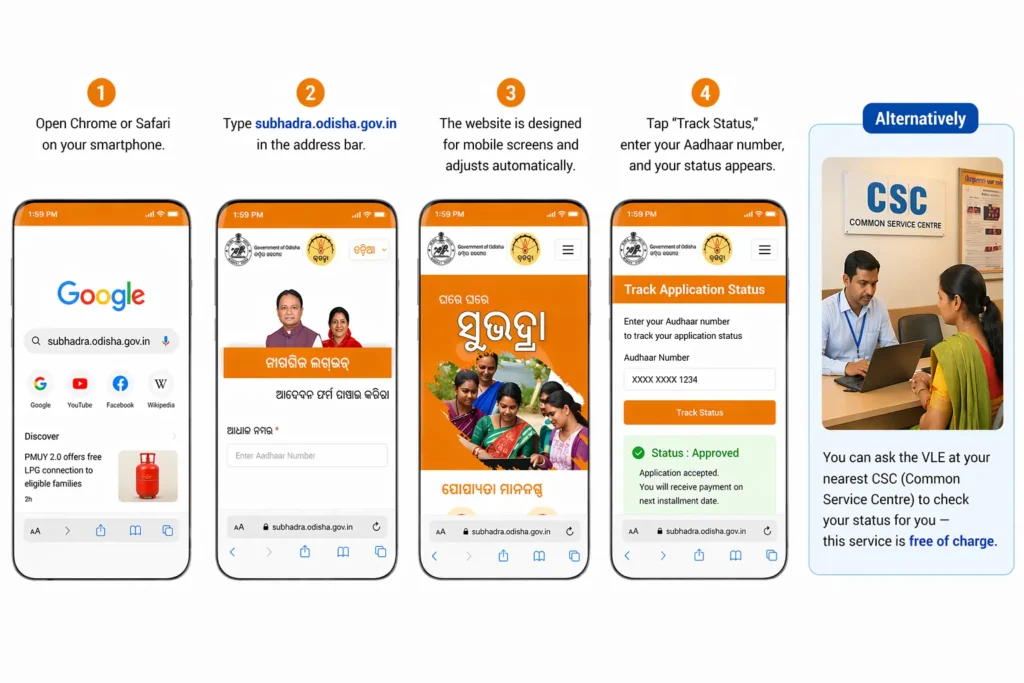
Open Chrome or Safari on your smartphone. Type subhadra.odisha.gov.in in the address bar. The website is designed for mobile screens and adjusts automatically. Tap “Track Status,” enter your Aadhaar number, and your status appears. Alternatively, you can ask the VLE at your nearest CSC (Common Service Centre) to check your status for you — this service is free of charge.
Common Status Check Problems and How to Fix Them
- Portal not loading: Try a different browser or clear your cache. The portal is sometimes slow during peak times try early morning before 9 AM.
- Aadhaar not recognised: Double check all 12 digits. If still not found, use your Application Inward Number from your receipt.
- OTP not received: Ensure the mobile number linked to your Aadhaar is active. If your number has changed, visit an Aadhaar Seva Kendra to update it first.
- Status unchanged for 60+ days: Visit your local Block Development Office (BDO) or CSC with your Aadhaar and application receipt to escalate.
Frequently Asked Questions Subhadra Yojana Status Check 2026
Q1. How do I check my Subhadra Yojana status using Aadhaar in 2026?
Visit subhadra.odisha.gov.in and click “Track Application Status.” Enter your 12-digit Aadhaar number or 16-digit Application Inward Number, then click Submit. Your status, Approved, Under Process, or Rejected will appear instantly. No login or account is required. The portal works on both desktop and mobile browsers.
Q2. What does "Under Process" mean in Subhadra Yojana status?
“Under Process” or “Under Verification” means your application has been received and is currently being reviewed by field verification staff, DLSC (District Level Selection Committee), or is pending e-KYC completion. This typically resolves within 15 to 30 working days. If it persists beyond 45 days, visit your nearest CSC or BDO office with your Aadhaar card and inward receipt to follow up in person.
Q3. My status shows "Approved" but I did not receive money — why?
If your status is Approved but no money arrived, check three things immediately: first, is your Aadhaar linked to your bank account? Second, is DBT (Direct Benefit Transfer) enabled on that account? Third, is it a single-holder account and not a joint account? Visit your bank with your Aadhaar and passbook to request Aadhaar seeding and DBT activation. Once resolved, the next installment will be automatically credited without reapplying.
Q4. Can I check Subhadra Yojana status without Aadhaar?
Yes. You can use your 16-digit Application Inward Number that you received on your acknowledgment receipt at the time of form submission. Enter this number instead of your Aadhaar on the status check page. If you have lost both, visit the CSC where you originally applied with your ID proof and they can retrieve your application details from the backend system.
Q5. How long does status update take after applying for Subhadra Yojana?
After form submission, the status typically reflects within 3 to 5 working days. Full approval with field verification and DLSC review takes 30 to 60 days depending on your district’s schedule. Payment is credited only after complete approval and Aadhaar-bank validation so applying early well before each installment date (August and March) is strongly recommended.
Q6. What is NPCI rejected status in Subhadra Yojana?
NPCI (National Payments Corporation of India) rejected status means that DBT payment was attempted but failed because your Aadhaar is not seeded to your bank account or DBT is not activated. Visit your bank branch with your Aadhaar card, bank passbook, and a photo ID. Ask the bank staff to complete “Aadhaar seeding” and “DBT enabling.” Verify through the NPCI Mapper after 7 to 10 working days after which you will receive payments normally.
Q7. How do I check 4th installment status in Subhadra Yojana?
The 4th installment of ₹5,000 was released on March 8, 2026. To check if you received it, visit subhadra.odisha.gov.in, enter your Aadhaar number in the status section, and look for “Payment Processed” with a March 2026 date. You can also check your bank passbook or SMS alerts for a credit from “SUBHADRA” or “GOVT OF ODISHA.” If not received and status shows “Payment Processed,” raise a grievance on the portal immediately.
Q8. Can I check Subhadra Yojana payment status on mobile?
Yes. Open Chrome or Safari on your smartphone and go to subhadra.odisha.gov.in. The website is fully mobile-responsive and the status check works exactly the same way as on a desktop. There is no official public mobile app the Subhadra App on Google Play is only for designated agencies doing Aadhaar e-KYC and cannot be used by general applicants to check status.
Q9. What should I do if my Subhadra Yojana status shows "Rejected"?
First, note the rejection reason code displayed on the portal. Common codes include name mismatch (update Aadhaar or bank records to match), duplicate application (withdraw the extra one at CSC), income above ₹2.5 lakh (submit updated income certificate), and ineligible category. After fixing the specific issue, reapply through your nearest CSC with corrected documents. Do not submit a new application without fixing the rejection reason first or it will be rejected again.
Q10. Is Subhadra Yojana status check free of cost?
Yes, checking your Subhadra Yojana status is completely free. You can check it yourself for free at subhadra.odisha.gov.in anytime without any charges. CSC centres are also supposed to provide status checks free of charge. If any agent or CSC is charging money to check your status, report it to the helpline at 14678 or file a grievance on the official portal.